Streamlining Your SEO Workflow with All-in-One AI Tools
You know the drill. Five tabs open for keyword research, a spreadsheet for mapping topics, a separate crawler, a content editor plugin, and a reporting deck that takes half a day to update. By Friday, you’ve spent more time stitching tools together than actually moving rankings.
Posted by
 Oleg Kozynenko
Related reading
The Ultimate Guide to AI Powered SEO Content Strategy
Picture this. It’s Monday, 8:30 a.m., coffee in hand. You’re juggling 1,200 keywords in a spreadsheet, opening 11 tabs to compare SERPs, building briefs by hand, and begging teammates for internal link suggestions. By noon, you’ve written… a title. Now flip it. You upload those queries into an AI-orchestrated workflow. It clusters them by search intent, drafts a brief with entities to cover, surfaces internal link opportunities, and flags gaps against competitors. By noon, you’re editing a strong draft and planning the next cluster.
How to Choose the Best AI SEO Tools for Your Content Workflow
Atlas Content had the right people. Smart strategists, solid writers, a reliable dev. But their SEO workflow was stuck in the past. They were juggling keyword research in spreadsheets, copying SERP data into briefs, and manually grading content against competitors. Technical checks lived in a separate crawler export. Monthly reporting took three days and stole time from strategy. Sound familiar?
The Complete Guide to AI SEO Optimization for LLM Search
Your page ranks, but the answer at the top is generated by an AI and cites someone else. Painful, right? This is the new reality of ai search engines. They retrieve, reason, and synthesize answers from a small set of sources. If your content is not in that set, your ai search visibility suffers. This guide shows you exactly how to win that inclusion. You’ll get a practical system for AI SEO Optimization for LLM Search, so your best pages get retrieved, cited, and recommended in answer engines.
Table of Contents
- Why Modern SEO Demands All-in-One AI Tools
- Key Features to Look for in an All-in-One AI SEO Tool
- The Benefits of a Unified AI SEO Platform
- Step-by-Step: How to Streamline Your SEO Workflow with AI
- Advanced Use Cases and Pro Tips for Maximizing AI SEO Tools
- Frequently Asked Questions About All-in-One AI SEO Tools
- Conclusion: Taking the Next Step Toward Effortless SEO
Why Modern SEO Demands All-in-One AI Tools
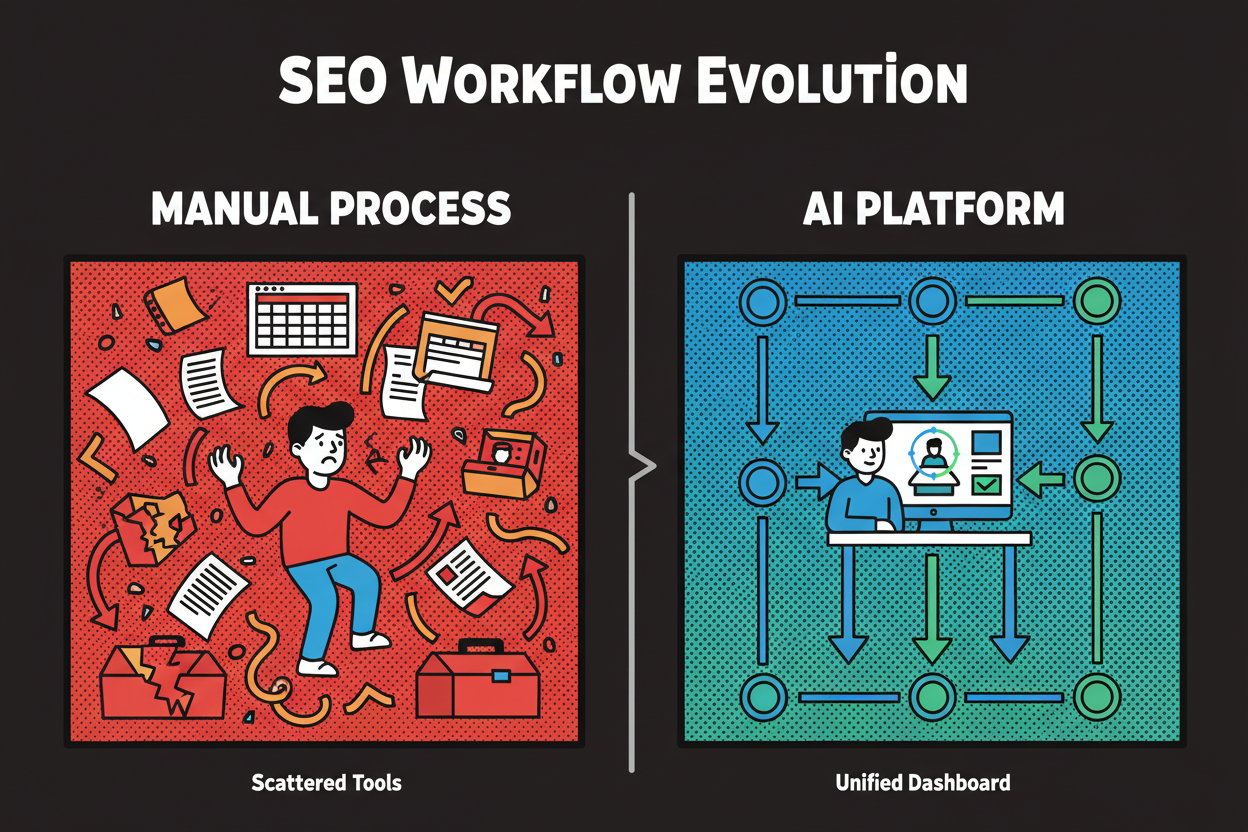
You know the drill. Five tabs open for keyword research, a spreadsheet for mapping topics, a separate crawler, a content editor plugin, and a reporting deck that takes half a day to update. By Friday, you’ve spent more time stitching tools together than actually moving rankings.
That’s not just your team. Recent studies show SEOs spend 8–10 hours weekly on keyword research and analysis, and 15+ hours building and optimizing three pieces of content. Reporting alone eats 4–5 hours per week for many teams. Those numbers come up again and again across industry surveys and time studies from sources like seoClarity and Search Engine Journal (seoclarity.net, searchenginejournal.com). No wonder 36.3% of practitioners say keyword research is their top time sink.
So what’s changing? AI is good at pattern-finding and repetitive work. And marketers report that 63% of their data-related time goes to tasks that could be automated (marketingprofs.com). It’s why a large share of teams already use AI tools to speed up meta tags, topic analysis, and reporting (seoprofy.com). The opportunity is to harness that power across your entire workflow, not just one part of it.
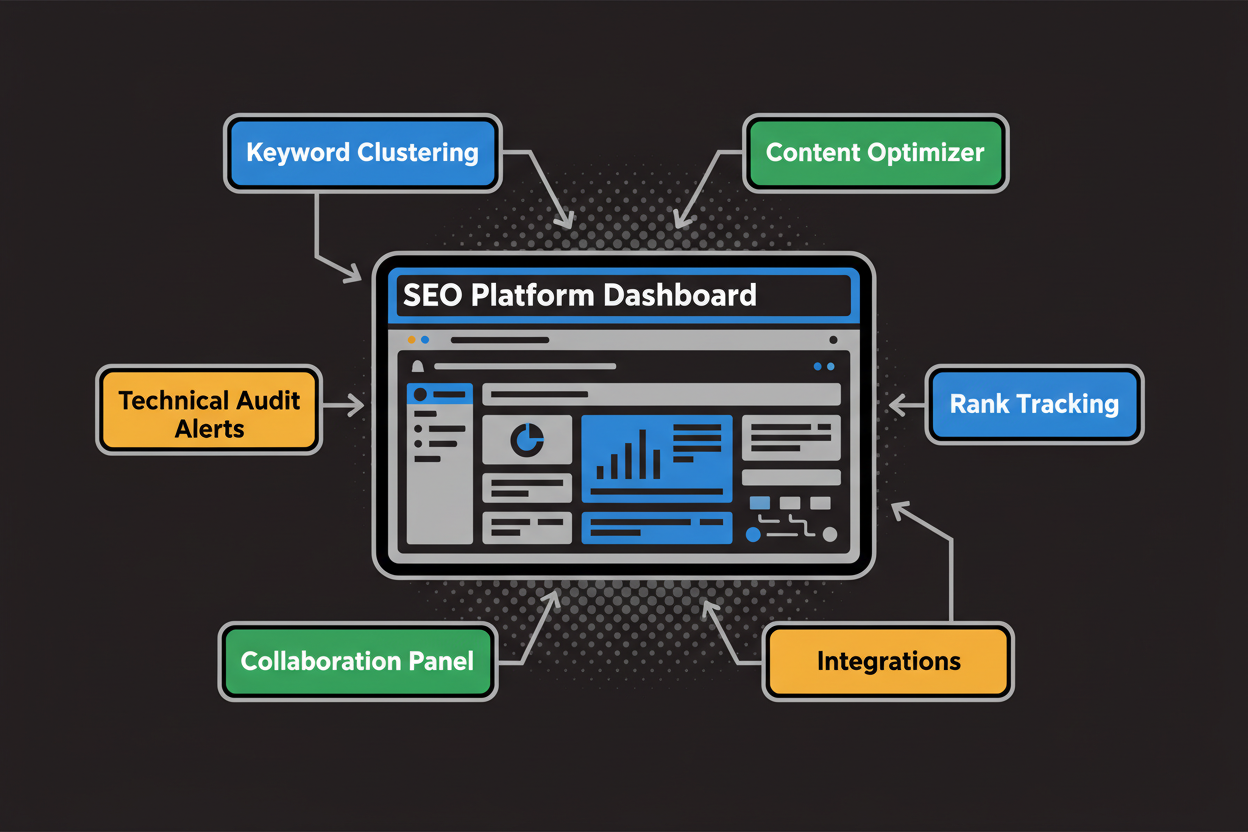
An all-in-one AI SEO tool pulls your core tasks into one system. Think automated keyword clustering, content briefs, on-page optimization, technical audits, rank tracking, and reporting, all tied together with collaboration and integrations. Instead of bouncing between tools, you move from plan to publish to prove in a single, connected flow.
Here’s what you’ll walk away with:
- How to evaluate an all-in-one AI SEO tool and the features that actually matter
- The real benefits you should expect (time saved, consistency, ROI)
- A step-by-step workflow to automate planning, production, audits, and reporting
- Advanced use cases, pitfalls to avoid, and how to integrate with your stack If traditional SEO felt like herding cats, this guide shows you how to put the work on rails. So what capabilities separate true all-in-one AI platforms from point solutions?
Key Features to Look for in an All-in-One AI SEO Tool
The best platforms don’t just bolt AI on top of old processes. They rebuild the workflow around automation and data. Below are the essentials, why they matter, and how to verify claims during a trial.
AI keyword research and clustering
Manual clustering is a grind. You pull hundreds of keywords, try to infer intent, then group and label them by topic. AI can analyze SERPs, entities, and similarity scores to cluster faster and more consistently. That means you get to content planning sooner.
Look for bulk imports, automatic clustering by intent, and easy editing. Clusters should map cleanly to briefs and target pages. The payoff is fewer overlaps, fewer cannibalization surprises, and a clearer content roadmap.
Content optimization and on-page automation
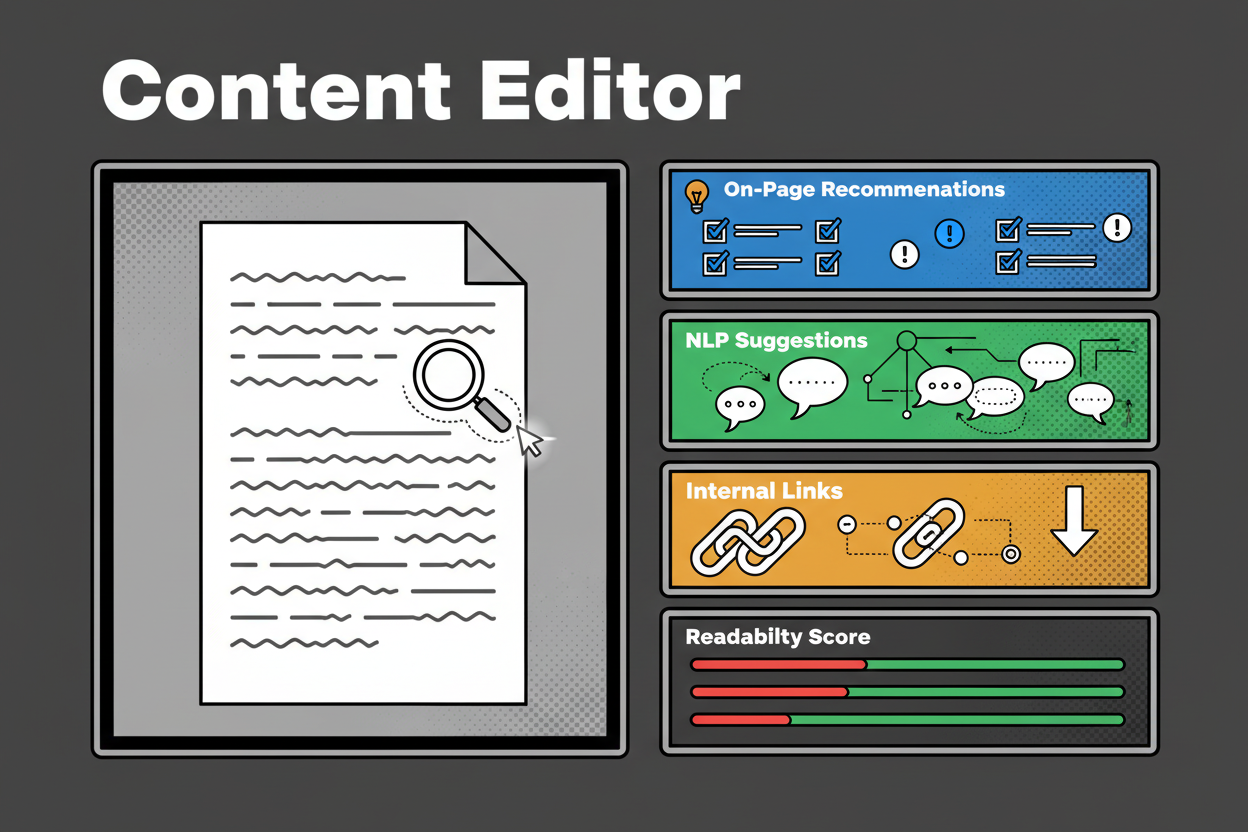
Your tool should turn a cluster into an actionable brief, then guide writers inside the editor. Expect real-time on-page suggestions, entity coverage, internal link prompts, and NLP scoring to keep drafts aligned with intent.
This is where teams recover hours. Instead of waiting on a post-publish audit, writers see exactly what to include and why. It drives consistency and reduces rework during reviews.
Technical SEO audits and auto-detection
AI crawlers can run frequently, prioritize issues by impact, and surface patterns you’d miss skimming logs. The key is triage. You want categorization by severity, page groups, and the ability to assign fixes. Bonus points if the platform suggests remediation steps or generates bulk metadata where appropriate.
Mini-case (directional): many teams report that a full manual technical crawl and triage takes 4–10 hours per site run. Continuous AI detection often reduces the initial pass to 30–90 minutes, with the platform teeing up prioritized fixes. Treat this as an illustrative benchmark, then validate against your site’s size and complexity.
Rank tracking, reporting, and analytics
Daily rank tracking is table stakes. The win is when your tracked keyword groups, target pages, and conversions roll into streamlined dashboards. This is where you reclaim those 4–5 weekly reporting hours many teams cite (seoclarity.net).
Expect one-click executive views, team-level performance reports, and automated alerts for drops or anomalies. You shouldn’t be exporting CSVs and merging charts every week.
Collaboration and workflow automation
If your platform doesn’t support roles, approvals, and in-app comments, your process will drift back to spreadsheets and Slack threads. Good systems bake workflows into the work. Assign briefs, set due dates, attach audit tasks, and track status across content and technical fixes.
Integrations and data connectivity
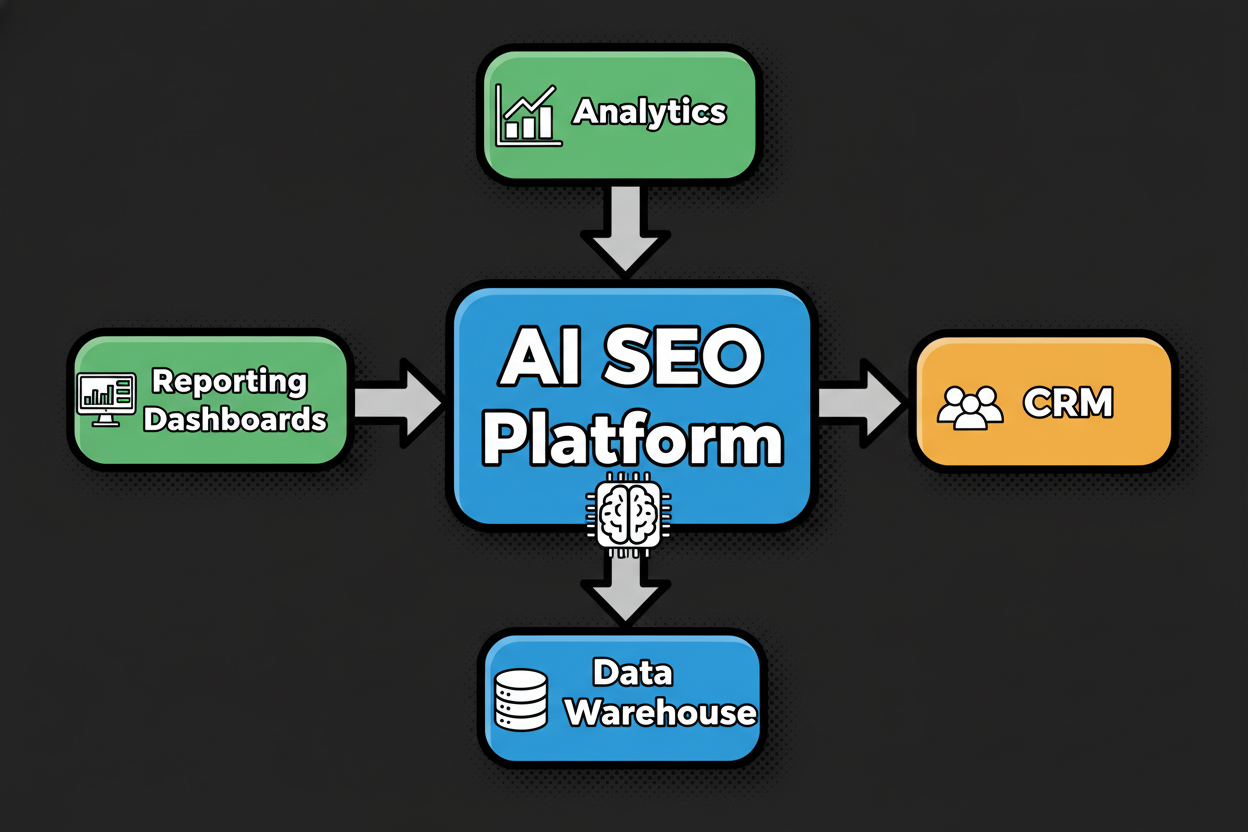
Integrations are the difference between isolated insights and business impact. At minimum, connect Google Analytics and Search Console. Ideally, you can push and pull data with your CMS, data warehouse, and BI tools. That’s how you align SEO with pipeline and revenue.
Here’s a practical matrix you can use while evaluating platforms.
| Capability | Must-have criteria | Nice-to-have | How to verify | Time impact estimate |
|---|---|---|---|---|
| Keyword research + clustering | Bulk import, automated clustering by intent/topic | Multilingual support | Upload sample list and inspect clusters | 2–6 hours saved per topic |
| Content optimization | Real-time on-page suggestions, NLP scoring | Internal link prompts | Optimize a draft and compare to on-page score | 30–60 minutes per page |
| Technical SEO audits | Automated crawl, prioritized issues | Auto-fix suggestions | Run a crawl and examine severity categories | 4–10 hours per crawl |
| Rank tracking & reporting | Daily tracking, SERP features | Competitor overlays | Create a dashboard with tracked keywords | 1–2 hours per report cycle |
| Collaboration & workflow | Roles, approvals, briefs | In-app comments | Assign tasks and review audit trail | 15–30 minutes per asset |
| Integrations & data | GA/GSC connectors, exports | Webhooks, warehouse | Connect to GA and test data sync | 1–2 hours per setup |
Pro tip: during trials, test with one real content cluster and one full-site audit. If the platform can’t deliver clear wins in a week, it won’t magically improve later.
When these features live in one platform, the payoff compounds. Let’s talk about what to expect.
The Benefits of a Unified AI SEO Platform
You’re not just buying features. You’re buying back hours, reducing errors, and making your output more consistent. Here’s how consolidation pays off.
Time saved and human error reduced
Time accumulates in the margins. Manual clustering here, rechecking metas there, reconciling two reports on Friday. Unified AI workflows remove handoffs and automate the repetitive parts.
Directionally, teams often report cuts like these: keyword clustering drops from 3 hours to 30 minutes per topic, on-page checks shrink from an hour to 20–30 minutes, and initial technical detection goes from 4–10 hours to under 90 minutes. These ranges align with industry time studies and common implementation benchmarks (seoclarity.net).
Small wins add up. And fewer manual steps mean fewer copy-paste errors and missed issues.
Consistency and scale
Humans are great at strategy and judgment. AI is great at repeating standards without getting tired. Put them together and you get content that follows the same playbook across dozens or hundreds of pages.
As one SEO leader put it, consolidation improves speed, consistency, and quality. That shows up in cleaner briefs, better entity coverage, faster reviews, and fewer surprises during audits.
Team collaboration and visibility
When keyword plans, content, audits, and reporting live in one place, everyone sees the same truth. Writers know what to draft and why. Developers see prioritized fix lists with due dates. Leaders get a single dashboard that connects rankings to traffic and conversions.
That shared context kills endless status pings and pointless meetings. And it gives you a predictable cadence to ship work every week.
ROI of all-in-one vs multiple point solutions
Let’s make the math tangible using a simple model.
Variables:
-
H is hourly cost per contributor.
-
Tm is manual time per task.
-
Ta is time with AI.
-
N is tasks per month.
-
C is monthly cost of the platform.
-
Δt is time saved per task (Tm - Ta).
-
Sv is monthly labor savings: Sv = Δt × N × H.
-
ROI% is ((Sv - C) / C) × 100. Worked example (directional):
-
H = 60
-
Keyword clustering: Tm 180 min, Ta 30 min, N 8 → Δt 150 min = 2.5 hours → Sv = 2.5 × 8 × 60 = 1,200
-
Content optimization: Tm 60, Ta 25, N 20 → Δt 35 min = 0.583 hours → Sv ≈ 0.583 × 20 × 60 ≈ 700
-
Technical audit: Tm 600, Ta 90, N 1 → Δt 510 min = 8.5 hours → Sv = 8.5 × 1 × 60 = 510
-
Reporting: Tm 180, Ta 45, N 2 → Δt 135 min = 2.25 hours → Sv = 2.25 × 2 × 60 = 270 Total monthly savings Svt ≈ 1,200 + 700 + 510 + 270 = 2,680. If C = 400, ROI% ≈ ((2,680 - 400) / 400) × 100 = 570.
Two notes. First, these are example inputs. Validate against your own time logs before committing. Second, the savings build over time as your team masters the workflow.
Here’s a clean before-and-after view you can share with stakeholders.
| Stage | Manual workflow | AI unified workflow | Measurable difference |
|---|---|---|---|
| Keyword discovery | Ad hoc tools, spreadsheets | Automated clustering pipeline | Fewer handoffs, faster briefs |
| Content briefing | Manual research and outline | AI-generated briefs with SERP insights | Higher consistency and speed |
| On-page optimization | Manual checks and edits | Real-time AI recommendations | Better scores, less rework |
| Technical audits | Quarterly manual crawls | Continuous AI monitoring | Faster detection and fixes |
| Reporting | Manual merging of sources | Unified dashboards and alerts | Reliable, repeatable reporting |
One more benefit often overlooked: focus. When your platform handles the busywork, you spend more time on strategy, links, and UX improvements that actually move revenue. That’s the compound interest of a good ai seo strategy.
Before we get tactical with the step-by-step workflow, a quick reality check. Where do most teams reclaim the most hours?
- Keyword research and clustering: typically 8–10 hours weekly across teams (seoclarity.net)
- Content creation and optimization: 15+ hours for three pieces, with 30–45 minutes per optimization cycle (seoclarity.net)
- Reporting and analytics: 4–5 hours weekly, often heavier for agencies and complex sites (seoclarity.net) These are the pockets where an all-in-one ai seo tool tends to unlock the fastest ROI. Here’s how to put it all to work in your daily ai seo workflow.
Step-by-Step: How to Streamline Your SEO Workflow with AI
You’ve seen the ROI and consistency gains. Now let’s put your all-in-one AI SEO tool to work in a clean, repeatable ai seo workflow you can run every week.
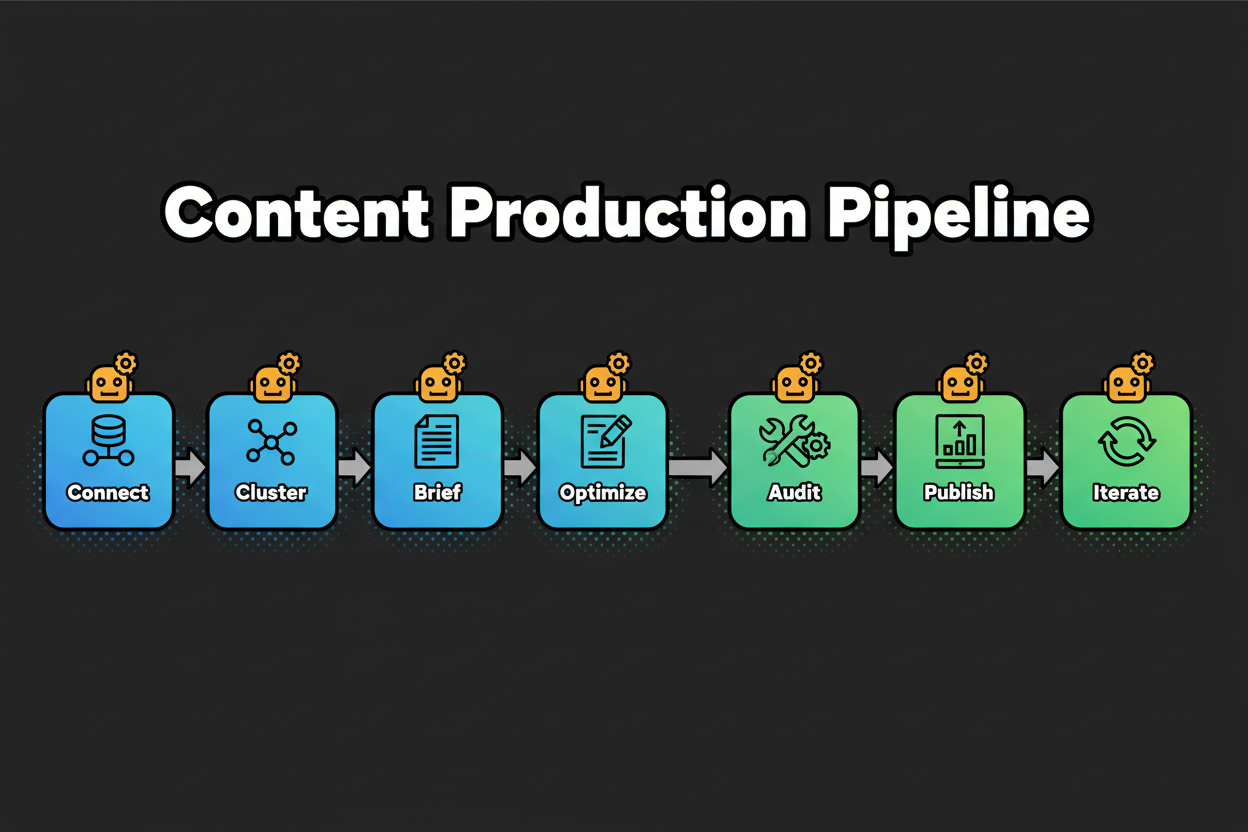
Quick Answer: How can I streamline my SEO workflow with all-in-one AI tools?
- Connect site, analytics, Search Console.
- Auto-cluster keywords by intent.
- Generate briefs and outlines.
- Optimize drafts with AI tips.
- Run audits; fix priority issues.
- Track ranks and KPIs.
- Iterate weekly from alerts.
Setup: connect your site and data sources
Start by linking Google Analytics, Search Console, and your CMS. Import your existing keyword lists and a URL inventory. Set roles and approvals so writers, SEOs, and developers see only what they need.
Two common snags here cause reporting headaches later. Missing permissions block data syncs or disconnect goals, so verify access for each connector. Duplicated tracking codes inflate sessions, so confirm one set of tags per property. Untagged conversions prevent ROI views, so map your key actions before you move on.
Expect this step to save you hours down the line. Clean connections mean reporting cycles shrink from hours to minutes because your dashboards always have the latest data.
Plan: automate keyword research and content planning
Upload raw keywords from your research and let the platform auto-cluster by topic and intent. Review the groups, merge duplicates, and label each cluster with a target page or content idea. Prioritize by potential: traffic, difficulty, and business value.
This is where you reclaim serious time. Clustering that once took 2–3 hours per topic typically compresses to well under an hour. The bigger win is consistency. You reduce overlap, avoid cannibalization, and get a clear monthly roadmap.
Watch for three pitfalls. Prioritizing by volume alone leads to content that never converts. Ignoring intent yields mismatched pages that miss the SERP’s pattern. Skipping difficulty ratings gets you stuck in high-competition topics when easier wins are available.
Produce: create content with AI briefs and on-page optimization
Turn each approved cluster into a content brief. Your all-in-one ai seo tool should pull SERP patterns, map entities, suggest headings, and surface internal links. Writers draft inside the editor, guided by on-page recommendations and NLP coverage.
Time savings stack up fast here. On-page checks usually drop from about an hour per page to 20–30 minutes. Reviews also move quicker because drafts follow the same structure and standards every time.
Avoid three traps. Over-reliance on AI text can flatten your voice, so keep your brand style front and center. Skipping fact checks risks credibility and E-E-A-T. Thin expert signals (no author bio, no sources) hurt trust, even if the content is optimized.
Use this content brief template to lock in quality:
| Field | Description |
|---|---|
| Target keyword cluster | Primary and secondary terms with intent |
| Searcher intent | Informational, commercial, navigational |
| SERP features | Top SERP patterns, people also ask themes |
| Angle and POV | Unique angle and audience pain points |
| Outline | H2-H3 structure with questions to answer |
| Entities and topics | Must-include entities and related terms |
| Internal links | Pages to link to and suggested anchors |
| External references | Authoritative sources to cite |
| On-page requirements | Title, meta, URL slug, schema, CTAs |
Fix: run technical audits and apply prioritized fixes
Kick off a full crawl. Your platform should group issues by severity and page type, then recommend fixes. Assign owners and due dates. Tackle quick wins first: redirects, broken links, metadata, and obvious schema gaps.
This stage turns a quarterly fire drill into a weekly rhythm. Initial detection time compresses from 4–10 hours to 30–90 minutes. You still need human judgment for impact, but you’re now choosing from a sorted list instead of hunting in the dark.
Three mistakes to dodge. Chasing low-impact issues while high-impact pages still have crawl errors. No SLAs or unclear owners, which stalls fixes. Not retesting or re-crawling after changes to confirm the problem is actually solved.
Use this triage template to keep the backlog crisp:
| Issue type | Severity | Count | Impact | Recommended action | Owner | Due date |
|---|---|---|---|---|---|---|
| Crawl errors | Critical | 24 | Indexation risk | Fix redirects, update sitemaps | Dev | 2025-01-15 |
| Missing meta | Medium | 180 | CTR risk | Generate metas in bulk | Content | 2025-01-12 |
| Slow pages | High | 37 | Conversion risk | Compress images, enable cache | Dev | 2025-01-20 |
| Schema gaps | Medium | 55 | Rich result loss | Add Article schema | SEO | 2025-01-18 |
Prove: monitor performance, report, and iterate
Map tracked keywords to target pages. Set alerts for rank drops, CTR changes, and new errors. Build a simple reporting cadence that serves executives, the SEO team, and developers. Each month, update your content backlog and refresh underperformers.
Expect reporting cycles to shrink from 2–4 hours to 15–45 minutes once everything lives in one dashboard. The trick is to connect rankings to conversions, not just traffic, so your priorities are clear and defensible.
Three pitfalls slow teams here. Chasing vanity metrics like broad impressions without conversion context. Not mapping keywords to target pages, which makes wins hard to attribute. No iteration cadence, so pages stagnate after launch.
Use this structure to keep the drumbeat steady:
| Report | Frequency | KPIs | Audience | Notes |
|---|---|---|---|---|
| Executive overview | Monthly | Organic sessions, conversions, share of voice | Leadership | Include ROI snapshot and key initiatives |
| SEO performance | Biweekly | Rankings, CTR, content output | Marketing + SEO | Add top wins, risks, and next priorities |
| Technical health | Weekly | Crawl stats, Core Web Vitals, errors | SEO + Dev | Include fix backlog and SLAs status |
Once this pipeline is humming, you’re ready for mastery and scale. That’s where advanced use cases and integrations multiply your gains.
Advanced Use Cases and Pro Tips for Maximizing AI SEO Tools
Let’s move from efficient to unfair advantage. These advanced plays use your all-in-one platform to find gaps your competitors miss and to connect SEO to revenue, not just rankings.
Use case 1: AI-driven competitive analysis and SERP gap discovery
Start with a competitive seed list. Pull the top 20 pages per rival across priority topics. Run AI clustering to group overlapping queries, then overlay intent and SERP features. The goal is to spot subtopics with weaker content or missing formats, like FAQs, comparisons, or tools.
Mini-case (directional): a product-led SaaS discovered a cluster of comparison queries with forum-heavy SERPs and thin vendor pages. They shipped a batch of briefs with side-by-side tables and entity-rich FAQs. Within a few cycles, they captured multiple top-3 spots and saw steady organic lifts, echoing the kind of gains reported when teams use AI-guided content optimization at scale. For example, Lyzr AI publicly shared a 150% jump in organic traffic after adopting Surfer for content planning and optimization, along with 200% more impressions and clicks in a short window surferseo.com.
Why it works: clustering exposes content patterns at scale. When you match intent and format to the SERP, your ai seo content aligns with what searchers actually want, not just keywords.
Use case 2: Track AI-sourced traffic and tie it to conversions in your CRM
AI search agents and AI-powered SERP experiences are now a real acquisition channel. Tag and segment referrals from AI surfaces where possible, and use campaign parameters to isolate this traffic. Then sync lead and deal data from your CRM back into the AI SEO platform or your data warehouse.
What you’ll learn: quality. In one directional case, an agency reported roughly 5% of total traffic coming from AI agents, but it was their highest converting segment xponent21.com. Another directional test in the auto sector documented higher conversion rates and longer sessions alongside strong traffic growth when adding AI-assisted optimization, plus a notable reduction in manual audit time snowseo.com.
How to use it: prioritize content that yields the best pipeline, not just the most visits. When your dashboards show that certain clusters drive qualified leads and revenue, your roadmap gets sharper.
Pro tips for experts
- Tune AI for niche sites: seed the model with your glossary, compliance rules, and subject matter sources. Tighten entity requirements in briefs to avoid generic takes.
- Sync conversions to steer priorities: bring closed-won and lead quality signals from your CRM into dashboards, then weight clusters by conversion value.
- Build governance into the tool: define roles, approvals, and audit trails. Require fact checks and E-E-A-T elements for every draft. Set SLAs for technical fixes and re-crawls so issues don’t linger.
- Treat AI outputs as first drafts: great for structure and coverage, but always add expert insight, unique data, and fresh examples to stand out. One more directional note on outcomes. Public cases show that teams combining AI-powered planning, on-page optimization, and continuous audits often report double-digit to triple-digit organic lifts over a few cycles, with some also citing better engagement and conversion rates surferseo.com snowseo.com xponent21.com. Your mileage depends on site quality, competition, and execution, but the pattern is consistent.
As you scale these plays, new questions pop up around security, human oversight, and measuring ROI. Let’s tackle those head-on next in the FAQs so your team can move with confidence.
Frequently Asked Questions About All-in-One AI SEO Tools
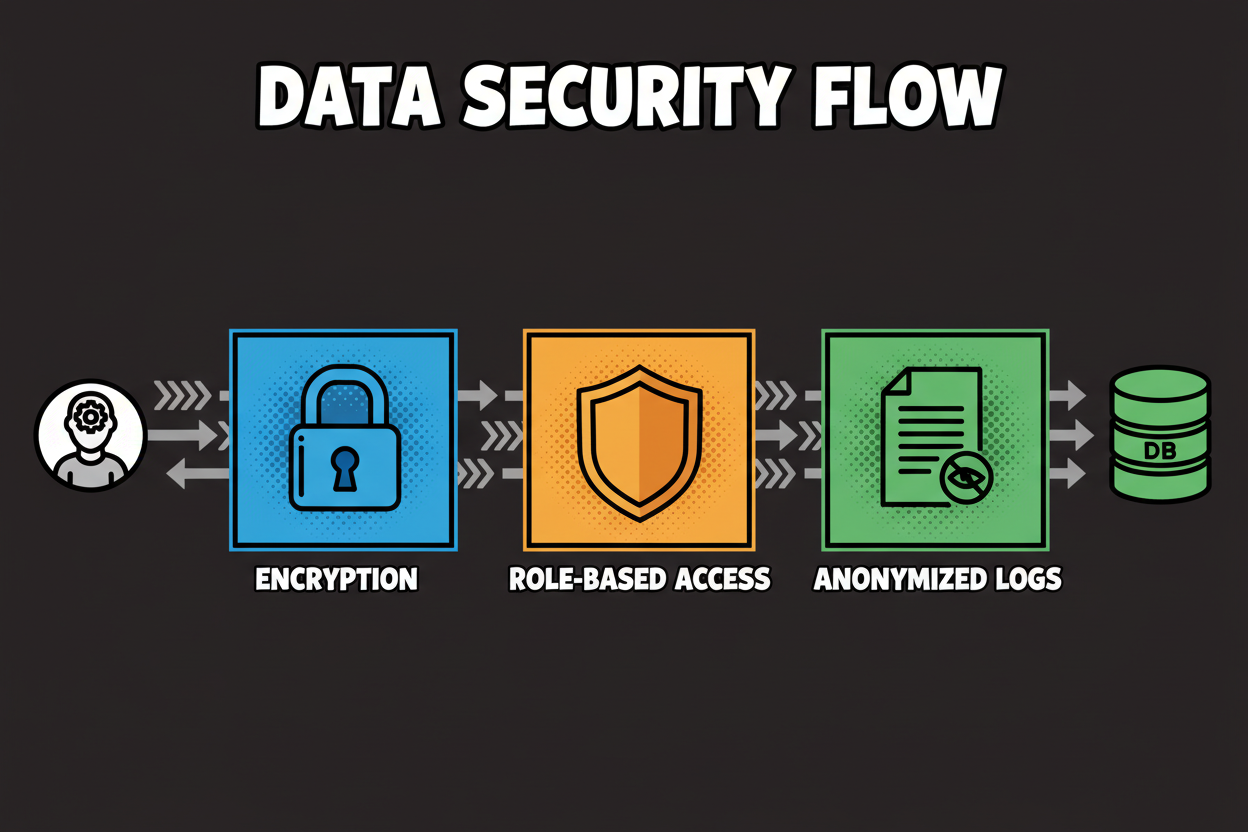
How secure is my data with an all-in-one AI SEO tool?
Look for proof, not promises. Enterprise-grade platforms typically hold SOC 2 and ISO 27001 certifications, enforce GDPR and CCPA with a signed DPA, and use encryption in transit (TLS 1.2+) and at rest (often AES-256). Strong identity controls matter too: SSO (SAML/OAuth), SCIM for user provisioning, granular RBAC, and detailed audit logs.
Ask about data residency options if you have regional needs, plus deletion SLAs for user content and backups. You want clear incident response steps and a security page you can hand to your legal team. If any of this is fuzzy, keep evaluating.
What should AI automate, and where must humans lead?
Automate repeatable, rules-based steps: keyword clustering, content briefs, on-page checks, technical issue detection, and routine reporting. AI excels at pattern work and scale. Humans lead where judgment and trust matter: strategy, narrative, original insights, fact checking, expert review, and prioritizing fixes.
Use E-E-A-T safeguards. Require author bios, sources, and review workflows for every long-form asset. Build an approval path so expert humans always have the final say before publish.
What are the real limitations or risks of these platforms?
AI can push sameness if you blindly follow scores. Over-optimization, hallucinations, stale data, and brittle integrations are common risks. There is also a learning curve for teams moving from spreadsheets to workflows.
Mitigate with guardrails. Feed the tool your style guide and glossaries. Pair AI recommendations with manual SERP reviews. Fact check anything AI-generated. Start with a small pilot to shake out integration issues before rolling out to the entire stack.
How do I measure ROI from an all-in-one platform?
Use a simple model and real time logs. Define H (hourly cost), Tm (manual time per task), Ta (time with AI), N (tasks per month), C (platform cost), and Δt (Tm - Ta). Monthly savings Sv = Δt × N × H. ROI% = ((Sv - C) / C) × 100. This is the same structure we used earlier to quantify savings across keyword, content, technical, and reporting.
Get a clean baseline first. Track actual minutes for 2–3 weeks. Then run a focused pilot with a clear start and end, and report weekly on leading metrics (time saved, tasks completed) and monthly on lagging metrics (rankings, traffic, conversions). Keep assumptions honest and adjust as workflows improve.
Will AI-generated content hurt rankings?
Not if you publish quality. Search engines reward content that matches intent, shows expertise, and helps users. AI can help you cover entities and structure, but your pages still need originality, clear claims, and proof. Avoid churning out thin, lookalike content across dozens of pages.
Make expert review non-negotiable. Add unique data, real examples, and insights from practitioners. Cite reputable sources. Maintain a consistent editorial voice. When AI serves the writer, not the other way around, quality goes up, not down.
Which integrations matter most for a unified AI SEO stack?
Start with Google Analytics and Search Console so planning, optimization, and reporting sit on the same data. A CMS connection speeds publishing and content updates. Analytics or BI tools help you blend SEO with engagement and conversion metrics.
If you report pipeline impact, connect your CRM to bring lead and revenue signals into prioritization. Data warehouses allow you to centralize everything for deeper analysis. APIs and webhooks are your safety valve when you need custom workflows later.
How fast will I see results, and what should I track?
Expect quick operational wins inside the first few weeks: faster briefs, shorter reviews, and clearer technical backlogs. Rankings and traffic are lagging indicators, so treat them as monthly or quarterly reads. Content impact compounds as you publish and refresh consistently.
Track leading indicators weekly: number of clusters completed, average on-page score, time to publish, pages audited, errors resolved, and indexation rates. Track lagging indicators monthly and quarterly: rankings, CTR, organic sessions, conversions, and revenue. Iterate every week, then step back each quarter to refresh your roadmap.
Conclusion: Taking the Next Step Toward Effortless SEO
A single all-in-one ai seo tool puts your entire ai seo workflow on rails. You save hours, ship more consistent content, and spot technical risks before they become fires. The payoff is focus. Instead of juggling tools, you invest time where strategy and creativity win.
You don’t need a massive overhaul to start. A tight pilot on one content cluster can prove time savings and ROI fast. When you see the lift, standardize the workflow and scale with confidence.
- Evaluate: Score 2–3 platforms against your must-haves, integrations, and security requirements.
- Pilot: Run a 30-day test on one keyword cluster and one full-site audit with clear owners and goals.
- Measure: Use the H, Tm, Ta, N, C, Δt model with real time logs and weekly reporting.
- Standardize: Document briefs, approval paths, SLAs, and dashboards so the process repeats.
- Scale: Expand to more clusters and templates, integrate CRM and BI, and refine with quarterly reviews.
{
"@context": "<https://schema.org>",
"@type": "Article",
"headline": "The Ultimate Guide to Streamlining Your SEO Workflow with All-in-One AI Tools",
"description": "Discover how all-in-one AI SEO tools can automate and simplify your entire SEO workflow. Learn key features, benefits, and practical steps for seamless, efficient optimization.",
"author": {
"@type": "Person",
"name": "Editorial Team"
},
"publisher": {
"@type": "Organization",
"name": "Your Brand",
"logo": {
"@type": "ImageObject",
"url": "<https://example.com/logo.png>"
}
},
"mainEntityOfPage": {
"@type": "WebPage",
"@id": "<https://example.com/blog/ai-seo-workflow-guide>"
},
"image": "<https://example.com/images/ai-seo-workflow-blueprint.png>"
}